
Ever found yourself squinting at a tiny label in the corner of a game box, wondering what that “E10+” or “PEGI 16” actually means? We’ve been there, especially when picking out a game for a younger sibling or browsing digital shelves with our own kids in tow. The gaming world might feel like an endless arcade, but here’s the truth: not every game is right for every player. That’s why understanding game ratings by age is a step every parent, player, and curious gamer should take, so everyone has fun without the nasty surprises.
Game ratings by age
Before jumping into the next adventure, it’s worth knowing that game ratings aren’t just stuffy warnings; they’re guides meant to help us all make good choices. Across the globe, there are different groups (and some fierce debates!) about what’s suitable for different ages. We’ve relied on these labels countless times, both as gamers chasing the latest releases and as friends helping families find those “just right” games.
1. Introduction: Why Game Ratings Matter for All Ages
To set the stage: plenty of new players; kids, teens, and grown-ups jumping back into gaming; don’t know what all those symbols and numbers mean. Some of us remember arguing with our parents in a game store about whether a game was “really that bad.” These days, age ratings make it easier for parents to spot what’s safe and help gamers of all stripes dodge stuff that might be upsetting or just not fun for them. Game ratings by age are like friendly gatekeepers; they don’t just block harm; they open the door to awesome, age-appropriate adventures.
2. What Are Game Age Ratings?
Think of game age ratings as traffic lights for gaming. These official labels tell us who a game is designed for, mostly based on the content; things like violence, strong language, or who you’ll run into online. They pop up on physical game boxes, digital storefronts, and even in commercials. Just as we check the nutrition info before buying a snack, we can check these ratings to see if a game fits our comfort zone.
Case in point: remember when Among Us took off? Despite looking harmlessly cartoony, its age is rated for “mild violence”; not a dealbreaker for many, but worth knowing before handing it off to a seven-year-old.

3. Major Game Rating Systems Around the World
Kids in Europe, teens in Japan, parents in the US; each region has its own referee for what’s okay for each age:
1. ESRB (Entertainment Software Rating Board) – This is what you’ll see everywhere in North America.
2. PEGI (Pan European Game Information) – Used across much of Europe, from Spain to Norway.
3. CERO (Computer Entertainment Rating Organization) – The gold standard in Japan.
4. USK (Unterhaltungssoftware Selbstkontrolle) – Germany’s authority on digital content.
5. ACB (Australian Classification Board) – Australia, doing its own thing (as always!).
It’s a bit like how Hollywood movies get a different rating in the US versus the UK—same entertainment, different rules. Game ratings by age work the same way: despite their differences, all these systems want the same thing: safer, smarter play..
4. What Do the Different Age Categories Really Mean?
Not all age labels are created equal! Each system divides things a little differently, but they share common ground. Here’s a cheat sheet:

1. ESRB:
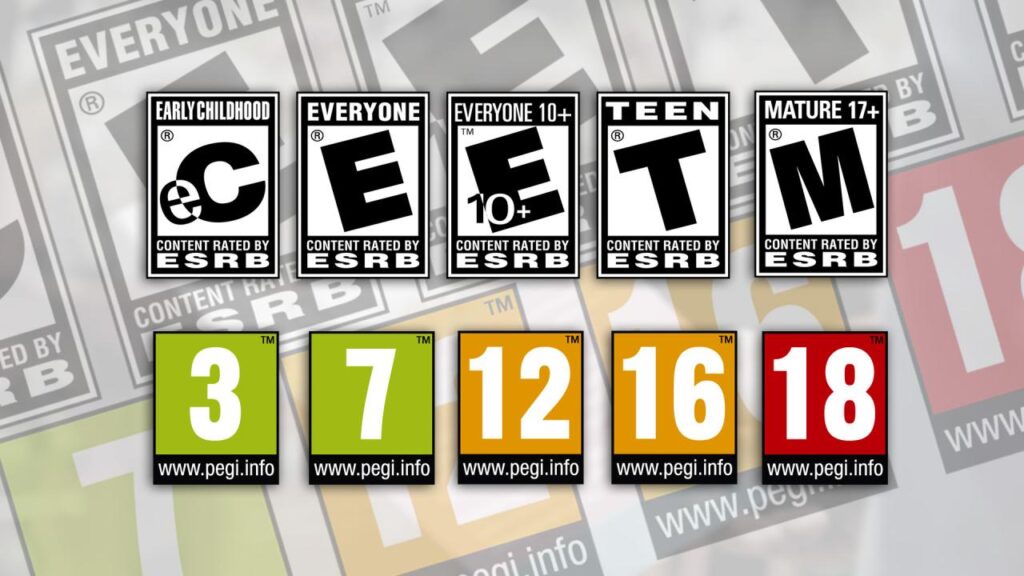
– E (Everyone), E10+ (Everyone 10+), T (Teen), M (Mature 17+), AO (Adults Only)
– Examples: Minecraft (E10+), Super Smash Bros. (E10+), The Legend of Zelda: Tears of the Kingdom (E10+), Call of Duty (M), The Witcher 3 (M)
2. PEGI:
– 3, 7, 12, 16, 18
– Examples: FIFA (PEGI 3), Pokémon (PEGI 7), Fortnite (PEGI 12), Overwatch (PEGI 12), Grand Theft Auto V (PEGI 18)
3. CERO:
– A, B, C, D, Z
– Examples: Animal Crossing (A), Pokémon (A/B), Persona 5 (C), The Last of Us (Z in Japan)
These categories cover more than blood and guts; think language, sexual content, gambling elements, or even scary vibes. For instance, Luigi’s Mansion is “E” but gets notes for spooky ghost content. Meanwhile, games like DOOM Eternal? Definitely for older teens and up, no question!
5. How Are Game Ratings Decided? (The Process)
Behind every little rating icon in game ratings by age, there’s a crew of people watching, playing, and assessing hours of footage. Rating boards look for violence, blood, bad language, scary moments, sexuality, simulated gambling, and now, even online chat features. Sometimes, they even preview scripts or storyboards before a game is out!

If a publisher thinks a rating is too strict (or too light!), there’s an appeals process where they explain or negotiate. A few famous titles, like the original Mortal Kombat and Manhunt, have had their ratings challenged, which often sparks huge debates in the gaming world.
6. Why Should Players and Parents Care About Ratings?
We’ve probably all bought a movie or game that turned out to be way more intense than we expected. Game ratings help us avoid those surprises, keeping unsettling or age-inappropriate content (graphic violence, mature language, dangerous themes) away from younger eyes and helping adults land exactly the vibe they want, whether it’s cozy or gritty. Ignoring ratings isn’t just risky for kids; it can sour the experience for everyone, especially when it comes to tough or dark content nobody saw coming.
7. Tips for Using Game Ratings When Choosing Games
Here’s a habit we swear by: before buying or downloading a new game, check the game ratings by age and, just as importantly, peek at the little content descriptors. These give you the real details (“Comic Mischief,” “Intense Violence,” “In-Game Purchases,” etc.). For families, try the game out together or watch a few gameplay videos. Parental controls on consoles can lock out games with certain ratings; one of the most helpful features if you’ve got younger or mixed-age players under one roof! Most importantly, talk to each other. Explaining why a game is or isn’t right for now leads to much less drama (and sometimes some great bonding).

8. Final Word: Making Smarter Game Choices With Ratings
In the end, game ratings by age are about keeping digital fun safe, surprising, in a good way, and accessible for everyone. They’re not walls, but guideposts, helping us all find the stories, challenges, and communities that suit our comfort zone. So next time you’re ready to press “Start,” check those little symbols first, share what you find out, and let’s make game time smart, safe, and full of laughs for the whole crew.
9. FAQs: Game Ratings by Age Explained
1. Are game age ratings legally binding, or just advice?
In some countries (like Germany), it’s illegal to sell games rated above a buyer’s age; shops can face heavy fines! Elsewhere, like the US, ratings are strong guidelines but not always enforced by law.
2. Do digital games and mobile apps have age ratings too?
Yes! The ESRB and PEGI both cover digital storefronts and mobile platforms. You’ll spot the rating at the download page or in the app store details.
3. Can ratings differ between countries?
Absolutely; what’s “Teen” in the US might be “PEGI 12” or “16” in Europe. Some games get edited or receive stricter categories in specific regions due to cultural differences.
4. Is it possible for a game to be re-rated after launch?
It happens! Sometimes, after updates, DLC, or a public outcry, rating panels review the game again and adjust its category. Other times, a censored version gets a different rating.
Infographics:
Major Rating Systems
- ESRB (North America): E, E10+, T, M, AO
- PEGI (Europe): 3, 7, 12, 16, 18
- CERO (Japan): A, B, C, D, Z
- USK (Germany) and ACB (Australia) have unique icons, too.
Each label signals the recommended minimum age and types of content found inside.
What Do The Categories Mean?
- Family & Kids: Minecraft (E10+/PEGI 7), Animal Crossing (CERO A)
- Teen: Super Smash Bros., Pokémon, Persona 5
- Mature: Call of Duty, The Witcher 3 (M/PEGI 18/CERO Z)
- Adults Only: Rare, but possible (graphic content)
Watch for content notes like “Violence,” “Strong Language,” or “In-Game Purchases” alongside the number or letter.
How To Use Ratings
Before buying, take a moment:
- Check the age symbol
- Read the content descriptors
- Use family settings if needed
- Play or preview games together
- Open up conversations about choices